
30th of May 2021
Why Load Times and Speed Are Important for Your Website
Does speed really matter? Why do I have to make my images smaller? How can I measure the speed of my website?
People are irritable. They expect to have their demands fulfilled quickly and to receive any information they require in a matter of seconds. When someone doesn’t obtain what they want, they become irritated and search for it elsewhere.
According to some statistics, half of us do not wait more than two seconds for website content to appear!
A fast-loading website is becoming a more important aspect of both user experience (UX) and search engine optimisation (SEO) (SEO).
Today’s users expect websites to load quickly, and those that don’t will almost certainly suffer the repercussions. According to an Aberdeen Group study, a one-second delay in website load time results in 11 percent fewer page views, a 16 percent drop in customer satisfaction, and a 7% drop in conversions. Google has also stated that one of the signals utilised by its algorithm to rank pages is site load speed.
What is the ideal loading time for your website?
Keep in mind that every second counts (or every split second). If your site takes between one and three seconds to fully load, you’re doing fairly well. However, you should aim for a page load time of less than one second to avoid losing consumers.
If your site takes four seconds or more to load, you’ll want to do everything you can to reduce that time.
Because page speed and user experience speeds are strongly associated, you will also have a good conversion ratio if your page load time is quicker for the user.
How can I measure the speed of my website?
Just visiting your own website isn't the best way to test your sites speed. For a number of reasons your experience may be different than your users. Luckily there are a number of services which measure your site speed in a highly accurate way and provide you with advice as to what you can do to improve your load times. Our preferred service is GTMetrix. Simply paste your site's url into the input box and click 'Test your Site'. You will be provide with a detailed report about your website and how it loads. Below is a screenshot of this website's report.
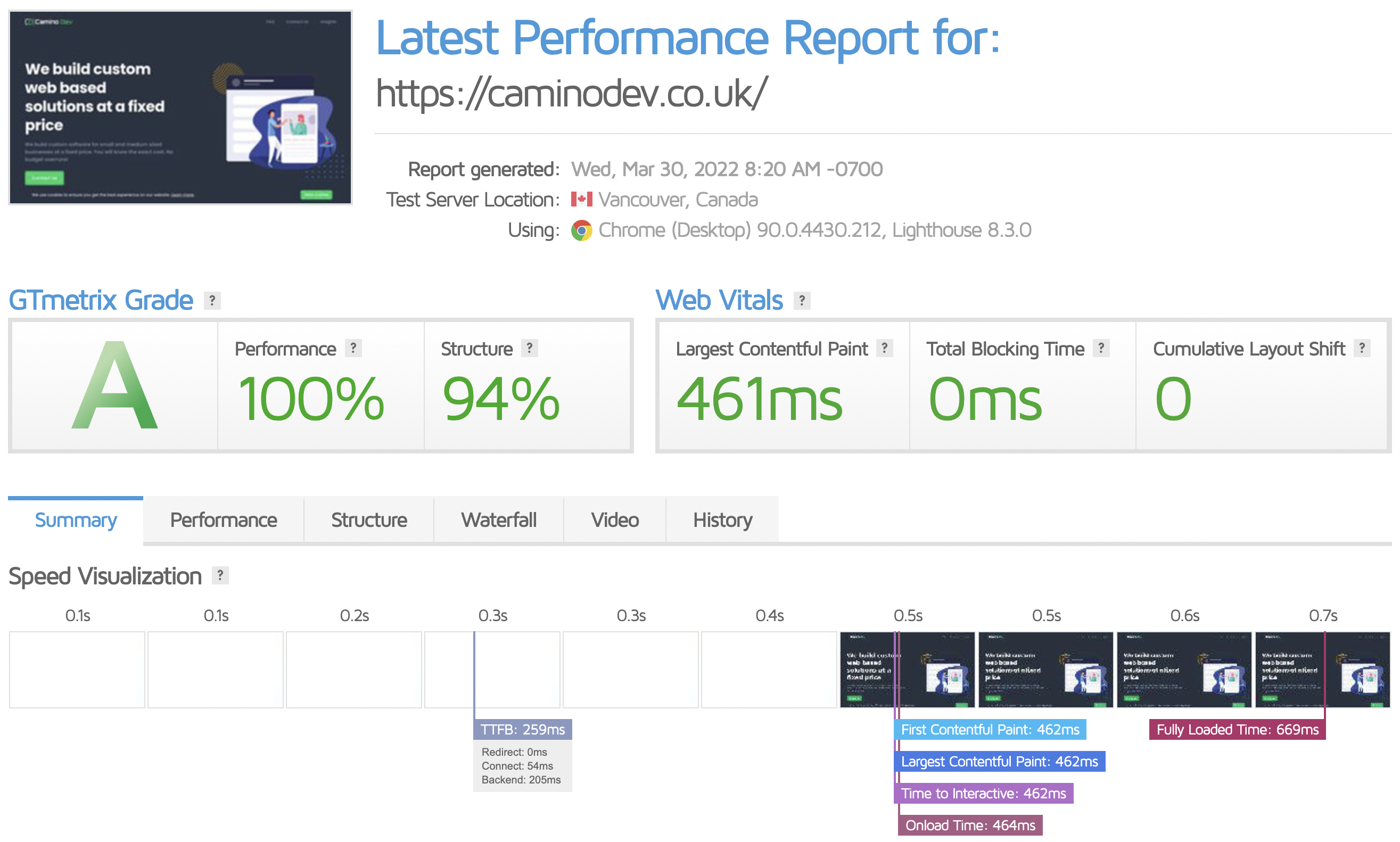
But why is the speed of a website’s load so important?
1. The first impression you make with your website is its speed.
On the internet, first impressions are crucial.
Your clients, readers, and website visitors from an immediate perception of you and your company.
If your website loads quickly, you’ve produced an excellent first impression. If it loads quickly, your new visitor will be overjoyed right away.
2. We anticipate a quick response!
When it comes to loading speed, the internet sets a high bar. Fast loading times are what we expect and want.
The facts are as follows:
· People want your site to load in less than two seconds, according to 47% of visitors.
· If it takes longer than 3 seconds, 40% of people will give up.
· With mobile visitors, you get a little more room to move around, but not much.
85 percent of web visitors expect a mobile site to load as quickly as or faster than a desktop site.
People are willing to wait a little longer for well-known and authoritative websites.
Small enterprises and startups, on the other hand, do not always have that luxury. It’s best to get going as quickly as possible right away.
3. Hands-on Experience
In general, user experience is critical for all websites. Slow websites also have an impact on desktop users. With mobile device usage on the rise and 61% of users saying they are unlikely to come back to a mobile site they had problems accessing, it is more crucial than ever to ensure quick mobile page loading rates.
While mobile sites tend to have slower connections, your users do not expect you to deliver anything less. Mobile customers want your website to load as rapidly as it does on a desktop or tablet.
According to eMarketer.com, mobile advertising will account for 72 percent of all digital ad spending in the United States by 2019. As a result of this ad investment, mobile traffic referrals from those adverts have increased. If mobile advertising accounts for a significant percentage of your marketing budget, boosting page speed should be a top goal.
Here are four techniques to improve your website’s speed:
1. Make image sizes and formats as small as possible.
Unoptimized pictures are one of the most typical causes of a slow website load.
Images that are too big, not scaled correctly, or structured incorrectly increase the amount of time needed for the browser to load the images on the user’s screen.
Large files take time to load, so any visitor who visits your site will have a less-than-ideal page experience. They take a few seconds to consider whether or not to click away from your website, leaving a bad first impression. If this continues, you’ll almost certainly notice a rise in bounce rates and a considerable drop in conversion rates.
After all, how can potential clients have faith in your company if your website is ineffective?
2. Browser Caching should be enabled.
The browser can save a range of data, including JavaScript files, pictures, and stylesheets, using this method of caching. The browser will not have to reload the entire page every time a user accesses it in this manner.
Consider using WP Rocket, a powerful caching plugin, if you built your site with WordPress. To optimize the performance of your web pages and provide lightning-fast loading times, this plugin uses cache pre-loading and page caching.
3. Make use of a Content Delivery Network (CDN)
A content delivery network also called a content distribution system, is a collection of computers that can make your web pages load faster. CDNs do this by promoting and providing static content copies from servers all around the world..
By reducing the distance data requests must travel between your host’s servers and browsers, this method can improve speed.
It sounds complicated but using a service such as Cloudflare is incredibly easy and for smaller websites it is completely free. This website is delivered to you and all users through Cloudflare. We were able to improve our average load time by 37% by simply using Cloudflare. It's easy and takes no more than 5 minutes.
4. Redirects should be kept to a minimum.
When you remove or move pages, you may need to use redirects. They are the most effective method for resolving broken link difficulties.
Having too many redirects, on the other hand, can result in more HTTP requests, which can slow things down, especially on mobile devices. Redirects should be kept to a bare minimum.
Conclusions
As a marketer of your business or service, your users must have a positive page experience every time they visit your site. It’s the hub of your operation, and it’s where users may engage with your material. Their interaction with your website will ultimately determine whether they become future consumers.
Aside from offering a better user experience, optimising your website’s performance will boost your SEO and raise your chances of ranking higher in the search results for your most valuable prospects.
Rather than abandoning your site due to slow loading times or faulty page elements, these leads will investigate your content and discover value in it, lowering bounce rates! Greater user engagement, boost conversions, and higher revenues will all result from this scenario.
Keep in mind that being more deliberate about your website’s speed performance will pay off handsomely in the long run for your company’s ROI.


